Branches
Proper branch naming and organization are essential for maintaining a clean, efficient workflow. Consistent branch names make it easy to identify what each branch does, link it to specific tasks, and understand its purpose at a glance. This organization prevents confusion when multiple team members are working on different features simultaneously, ensures a smooth code review process, and helps maintain a clear project history that’s easy to navigate and manage. This branch strategy is inspired by Github Branching Name best practices.
Main branches
Section titled “Main branches”- main → Main branch, represents the production state.
- stage → Staging branch, used for testing and integration before production.
- dev → Represents the dev state of the project.
Naming convention
Section titled “Naming convention”Each working branch follows this format:
<keyword>--<description>--<clickup-id>Example:
feature--post-salesforce--86dxq5zn6Keywords
Section titled “Keywords”| Keyword | Recommended use |
|---|---|
create | Add a new module or page |
feature | Integrate a third-party service or add an endpoint |
fix | Bug fixes |
refactor | Code restructuring without changing functionality |
design | Visual or design changes |
test | Add or modify tests |
Description
Section titled “Description”- Use kebab-case (lowercase with hyphens).
- Keep it short and descriptive.
- Avoid spaces, accents, or special characters.
ClickUp ID
Section titled “ClickUp ID”- Add the ClickUp card ID at the end for task tracking.
- Example:
--86dxq5zn6
Example branch names
Section titled “Example branch names”create--module-cta-aninmated--86dxq5zn6
feature--post-to-salesforce--86dxq5zn6
fix--error-slider--86dxq5zn6
refactor--php-8-compatible--86dxq5zn6
design--update-header-spacing--86dxq5zn6
test--animation--86dxq5zn6Step by Step workflow
Section titled “Step by Step workflow”- Create a branch from
mainusing the naming convention above: Example:fix--cardE--86XXXX - Make your changes and verify everything works locally (tests/build/lint as applicable).
- Pull request of the
devorstagebranch (whichever environment you’ll work) so you have the branch updated with the latest changes. - Merge
fix--cardE--86XXXXinto branchdevorstage(depends of the needs) via merge process. - Deploy to the Dev/Stage environment and validate the changes there.
- Is everything OK in Dev/Stage?
- If no → fix issues on the same branch (
fix--cardE--86XXXX) and repeat steps 2 to 5. - If yes → continue.
- If no → fix issues on the same branch (
- Update your branch with the latest
main. For that:- Switch to your branch
fix--cardE--86XXXX - Pull latest
main. - Merge
maininto your branch. - Verify again (tests/build).
- Switch to your branch
- If all is OK, merge your branch into
main. - Deploy to production.
- Delete the working branch
fix--cardE--86XXXX.
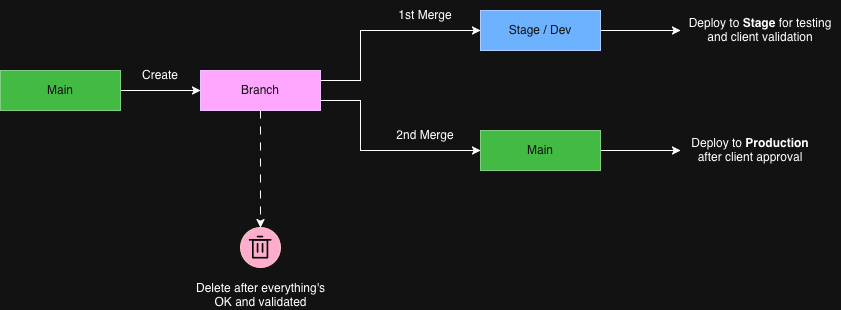
Do’s and Don’ts
Section titled “Do’s and Don’ts”| ✅ DO | ❌ DON’T |
|---|---|
Use the format keyword--description--clickup-id | Create branches without following the naming convention |
| Use clear, short, kebab-case descriptions | Use spaces, uppercase letters, accents, or special characters |
| Always include the ClickUp card ID | Skip the ClickUp ID or use an incorrect one |
Create your working branch from main | Start working directly on main, stage, or dev |
| Keep branches focused on one task | Mix multiple unrelated changes in one branch |
Merge your branch into dev or stage for validation | Merge directly into main without prior validation |
Make sure dev, stage, and main match their environments | Let branches drift from what’s deployed |
Update your branch with the latest main before final merge | Merge outdated branches into main |
| Test your changes locally and in dev/stage | Deploy without testing or reviewing |
| Keep every main branch separate | Merge stage into production |
| Delete your branch after it’s merged and deployed | Keep old branches after the work is done |
| Ask for help if you’re unsure about the flow | Guess or improvise with merges and deploys |
It’s important to watch this video to have full context of the explained topics. If the video doesn’t load or stops with an error, you can watch it directly on Loom.
Knowledge Check
Test your understanding of this section
Loading questions...