AssetManager.js
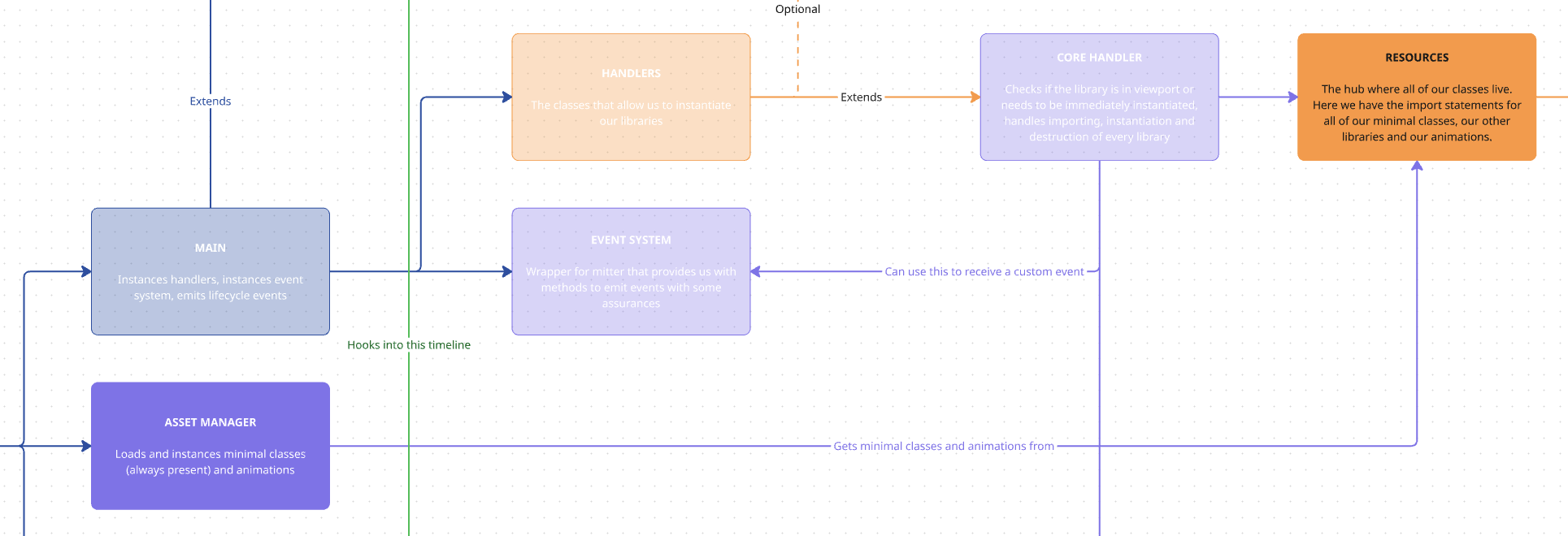
This class is in charge of loading all of our minimal libraries at the first page load. It also contains the methods to load our animations both in first page load and in our page transitions.
Libraries
Section titled “Libraries”Minimal libraries are the ones that the framework needs to function, such as GSAP, Boostify or IsElementInViewport.
async getLibraries() { this.libraries = getMinimal(); }We retrieve the libraries from our minimal array in our resources file, and then we load them:
async loadLibraries() { await Promise.all([ ...this.libraries.map(async (asset) => { return new Promise(async (resolve, reject) => { try { if (asset.resource) { const library = await asset.resource(); if (typeof library !== "undefined") { this.Manager.addLibrary({ name: asset.name, lib: library }); this.updateProgress(); resolve(true); } else { reject(new Error(`Library ${asset.name} is undefined`)); } } } catch (error) { this.debug.error(`⚠️ [assetManager.js] Error loading/executing library ${asset.name}:`); } }); }), ]); }We use this method inside our Project class to load all libraries marked as minimal and add them to our Manager. This process will make these libraries available to be instantiated from the rest of our core files.
Progress
Section titled “Progress”We have an integrated function here to calculate our real progress of importing our minimal libraries, so this could be added into our preloader to show a real progress bar.
async calculateProgress() { this.total = this.libraries.length; this.loaded = 0; // Initialize progress at 0 if (this.progress) { this.progress(0); } }This first one allows us to initialize our progress at 0%. This one is used in Project after getting our libraries.
updateProgress() { this.loaded++; if (this.progress) { const newPercentage = (this.loaded / this.total) * 100; const previousPercentage = ((this.loaded - 1) / this.total) * 100; this.animateProgress(previousPercentage, newPercentage, this.progress); } }This one is in charge of updating that progress, and it’s the one we call in our loadLibraries method after each library has been loaded.
async animateProgress(from, to, callback) { for (let i = Math.ceil(from); i <= Math.floor(to); i++) { callback(i); } }Finally, this method is used to create the animation of said progress using a callback.
Animations
Section titled “Animations”We have three animation-related methods in our Asset Manager.
async getAnimation(name) { const existingLibrary = this.Manager.libraries[name]; if (existingLibrary) { this.debug.import(`✅ Animation ${name} was already in Manager`, { color: 'pink' }); return existingLibrary; } const animations = getAnimations(); const animation = animations.filter((animation) => animation.name == name)[0]; const library = await animation.resource(); this.Manager.addLibrary({ name: animation.name, lib: library }); this.debug.import(`🚧 Importing animation ${animation.name}`, { color: 'pink' }); return library; }This first one allows us to retrieve a single animation from our animations array (in resources), imports it and adds it to the Manager.
This is what we will use when we want to add our animation libraries.
    async importAutoAnimations({ tl, eventSystem }) {        const animations = getAutoAnimations();        animations?.map(async (animation) => {            let importedAnimation;            if (animation.options.condition && typeof animation.options.condition == "function") {                const shouldLoad = animation.options.condition();                if (!shouldLoad) return;            }            if (animation.options?.selector) {                importedAnimation = this.Manager.libraries[animation.name];                importedAnimation &&                    this.debug.import(`✅ Animation ${animation.name} was already in Manager`, { color: "green" });                if (!importedAnimation) {                    importedAnimation = await animation.resource();                    this.Manager.addLibrary({ name: animation.name, lib: importedAnimation });                    this.debug.import(`🚧 Importing animation ${animation.name}`, { color: "pink" });                }                if (importedAnimation) {                    const animationInstance = new importedAnimation({                        element: animation.options?.selector,                        Manager: this.Manager,                        eventSystem                    });
                    this.Manager.addInstance({                        name: animation.name,                        instance: animationInstance,                        element: animation.options?.selector,                        method: "AssetManager",                    });                    importedAnimation && tl.add(animationInstance.init());                }            }            return tl;        });    }
This one, a bit more complex, is the one we use both in Project for first page load and in our transitions file.
This method will check if our animation should load, check if it’s present in the page that we’re loading, and try to fetch the animation from the Manager.
If it’s not in the Manager, it will then import the animation, instance it and add both the library and the instance to the Manager. Finally, it will add the animation to the animation timeline.
Here we’ll send the event system to the animations in case we want to instance a class when the animation ends.
async destroyAutoAnimations() { const animations = getAutoAnimations(); animations.map(async (animation) => { const animationInstances = this.Manager.getInstances(animation.name); animationInstances?.map((animationInstance) => { if (animationInstance && animation.options?.selector && animationInstance.instance.destroy) { this.debug.instance(`❌ Destroy: ${animation.name}`, {color: 'red'}) animationInstance.instance.destroy(); this.Manager.cleanInstances(animation.name) } else if (animationInstance && animation.options?.selector) { this.debug.error(`Animation ${animation.name} does not have a destroy method`); this.Manager.cleanInstances(animation.name) } }); return; }); }And after every instance, there must be a destroy, so when we leave any page we use this method to take care of destroying any animation instances that were being used in it, so we can enter the next page clean.
Knowledge Check
Test your understanding of this section
Loading questions...