Custom ACF Fields
Standard ACF fields cover most needs, but sometimes we require more visual and intuitive fields that the default plugin does not provide. Terra uses custom ACF fields to extend functionality and improve the editor experience.
Why Use Custom Fields
Section titled “Why Use Custom Fields”Custom fields allow us to:
- Provide visual controls that are easier for editors to use.
- Handle specific project requirements that standard fields cannot cover.
- Maintain consistency across different projects by reusing the same field setup.
Common Examples at Terra
Section titled “Common Examples at Terra”Some frequently used custom fields include:
- Section Spacing: A field that allows editors to adjust spacing visually between sections.
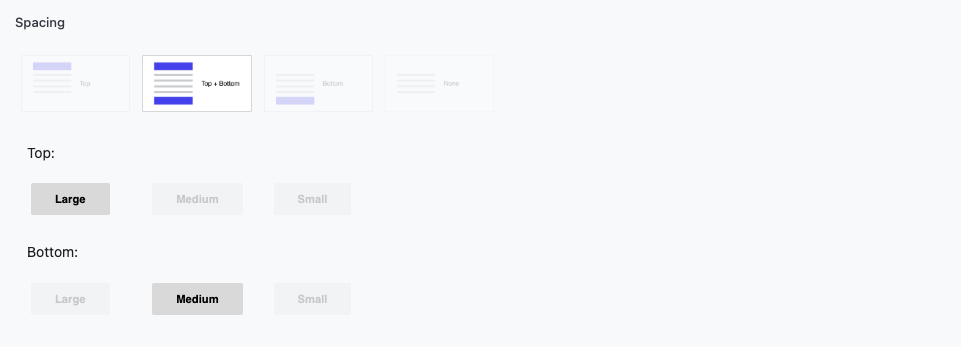
- Background Color: Shows the exact color the editor is selecting, rendering the input with a live color preview.

These fields improve the user experience by making it clear and intuitive what the selected values represent.
Implementation
Section titled “Implementation”Custom ACF fields in Terra are typically organized in a dedicated folder within each project and include:
- PHP: Registers the custom field and defines its behavior.
- JS: Enhances the field in the editor with dynamic or interactive functionality.
- CSS: Styles the field for visual clarity and consistency.
This separation ensures that custom fields can be easily reused across multiple projects while keeping the code organized and maintainable.
Typical folder structure for custom ACF fields in Terra projects
Section titled “Typical folder structure for custom ACF fields in Terra projects”functions/project/utilities/acf/
├─ acf-spacing/│ ├─ init.php│ ├─ class-PREFIX-acf-field-spacing # PHP logic│ └─ assets # CSS for visual styling│ │ └─ css│ │ └─ fields.css│ ││ ├─ images│ └─ js # JS for editor enhancements│ └─ field.js│└─ acf-all-backgrounds/ ├─ init.php ├─ class-PREFIX-acf-field-allbackgroundcolor # PHP logic └─ assets # CSS for visual styling │ └─ css │ └─ background-color.css │ └─ js # JS for editor enhancements └─ background-color.jsUsing Custom Fields in Code
Section titled “Using Custom Fields in Code”When using custom ACF fields in PHP, we often apply CSS classes to convert raw data into values directly usable in the frontend. A simple example:
<?php$title = $module['title'];$subtitle = $module['subtitle'];$spacing = get_spacing($module['section']['spacing']);$bg_color = $module['section']['bg_color'] ?? 'f--background-d';?>
<section class="<?= esc_attr($spacing) ?> <?= esc_attr($bg_color) ?>">    <h2 class="c--title"><?= esc_html($title); ?></h2>    <p class="c--subtitle"><?= esc_html($subtitle); ?></p></section>
In this example:
get_spacing()is a helper function that converts the custom spacing field value into a CSS class.- The background color field is applied as a class to the section.
- Title and subtitle fields are safely escaped and rendered with their own CSS classes for consistent styling.
This approach ensures that editors can select values visually, and developers can use them directly in the code with proper classes, keeping the frontend consistent and maintainable.
Summary
Section titled “Summary”Custom ACF fields, combined with helper functions and CSS classes, provide a flexible and user-friendly way to manage data. Editors benefit from intuitive controls, and developers can integrate the values cleanly into the frontend, ensuring consistency, reusability, and maintainability.
→ Continue to Repeater & Relationship
Knowledge Check
Test your understanding of this section
Loading questions...